The fitness industry is a business based on motivation and the only definite method towards motivating athletes, gym-goers and online followers is through training videos to get to the extremes. The same can be said about a personal trainer posting your workout ideas on Instagram or a coach making content on the fitness-related app; motivating videos can be implemented and be used to build loyalty. CapCut gives you access to the desktop video editor that lets you create high-energy and professional video clips without the need to edit them at the professional level.
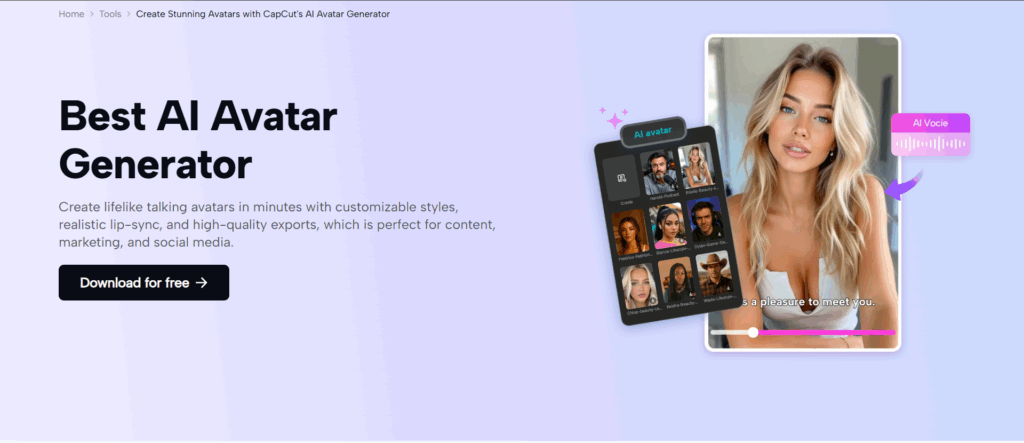
One of them is the AI avatar, where over 1000 customizable characters are available and up to 150 AI voices can be used to give dynamic, motivational narrations. It is applied to create virtual trainers who a trainer utilises to make exercises personal and motivational.
CapCut desktop allows trainers to make videos that showcase any training in a catchy and interactive manner and go viral on Facebook, YouTube, TikTok or any app related to fitness and motivate people to achieve their goals.
Post Contents
The importance of Motivational Training Videos in Fitness.
Empowering Action through Dynamic Narration
Videos that discuss training topics with relatable and hype-based narration motivate viewers to continue watching the content. The AI avatars at CapCut use high-energy voiceovers to inspire viewers when performing HIIT or demonstrating good form, and make workouts more memorable and effective.
Facilitating Fast Content Generation
To keep the audience active, fitness professionals should be able to create content regularly. The easy-to-use interface of CapCut simplifies the video editing process and enables trainers to compile avatar-linked narratives into videos quickly, ensuring a steady flow of content to social media or coaching platforms.
The use of AI in Fitness Content
Increasing the interest in AI Avatars
The training videos are transformed with the help of the AI avatar feature of CapCut that offers over 1,000 characters and 150 AI voiceovers. Trainers can also create avatars that fit their brand-e.g., a colorful coach to do cardio with or a serene yogi and give them a specific motivational tone to entice and encourage viewers to do something.
Diversifying to fit Fitness Audiences
AI avatars will allow trainers to tailor videos to various types of audiences, like an amateur who requires motivation and a professional athlete who requires intensity. The ability to customize characters and voiceovers allows content to reach all levels of fitness, increasing engagement on social media, such as Instagram or fitness apps.
How AI avatars can be helpful in training videos.
Training videos can be complemented with the help of AI avatars in various fitness environments:
- Exercises: Fitness gurus demonstrate exercises in a very positive manner.
- Tutorials: description of proper strength training or yoga or technique.
- Problems: Virtual characters add excitement to the fitness challenges to encourage people to participate.
- Warm-Ups /Cool-Downs: Avatars have stretch or relaxation programs that play soothing music.
- Offers: Gym sessions or web-based services are promoted with a branded avatar, however, without generic voiceovers; instead, customized and convincing voices can be adapted to a particular fitness objective and target audience.
Ready to create an AI-Improved Training Video
Trainers need to strategize their video content before taking CapCut:
- Determine the training emphasis (e.g., cardio, yoga, or strength).
- Select a type of avatar (e.g, enthusiastic coach or relaxed instructor).
- Pitch style of personality to the audience (e.g,. gung-ho with youthful athletes, corporate fitness).
- Script to narrate AI avatar (e.g., hints at motivation or instructions)
In this way of planning, the avatars can be developed according to the motivational and instructional goals of the video.
Easy steps to create motivational training videos on the CapCut desktop
Use the following steps to make training videos motivational on CapCut desktop, and use simulated screenshot notes that will help you to follow these steps.
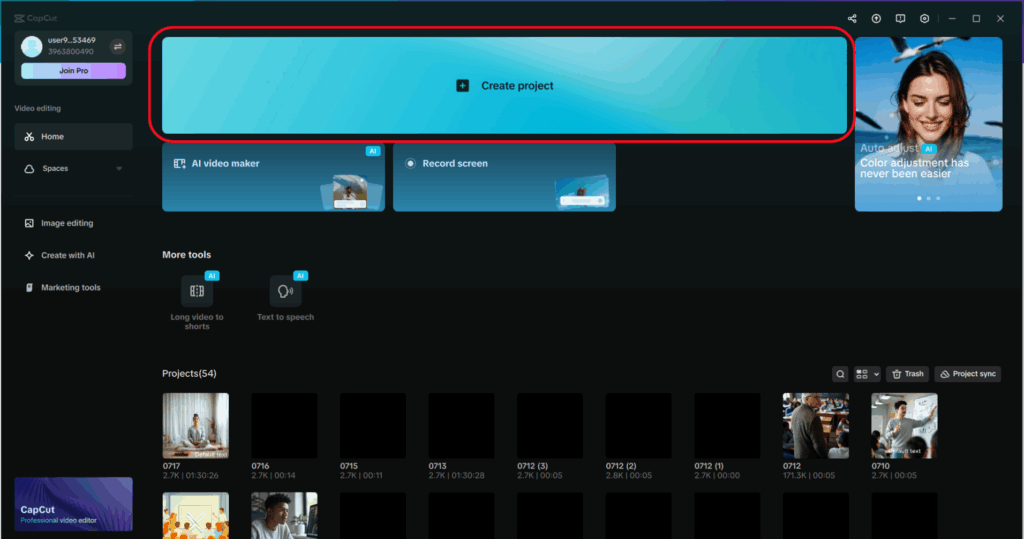
Step 1: Start CapCut Desktop and create a new Project
Get CapCut Desktop on the official site. Open the program and “Create project” to open a new workspace where you can save your training video. The intuitive interface is perfect when the trainer is new to editing.
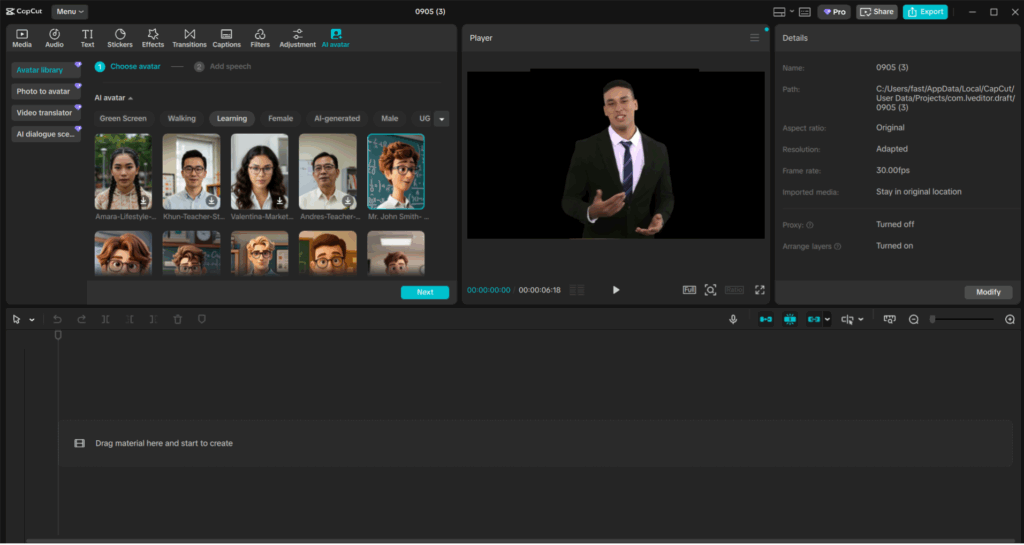
Step 2: Select AI Avatar Feature
To add AI avatars in CapCut, first, select an avatar of your choice in the “Avatar Library” on the “AI Avatar” tab. The available avatars are sorted into different categories such as green screen, walking, learning, female, male, and AI-generation.
Step 3: Add speech to your Avatar
You have chosen an avatar. Now go on and add speech to the avatar by clicking the “Add Speech” button, where you can write a script yourself or load one that has been pre-written. Then you have to select the voice of the avatar. There are also a few languages to be spoken, like Adam in English or Jessie in an expressive style.
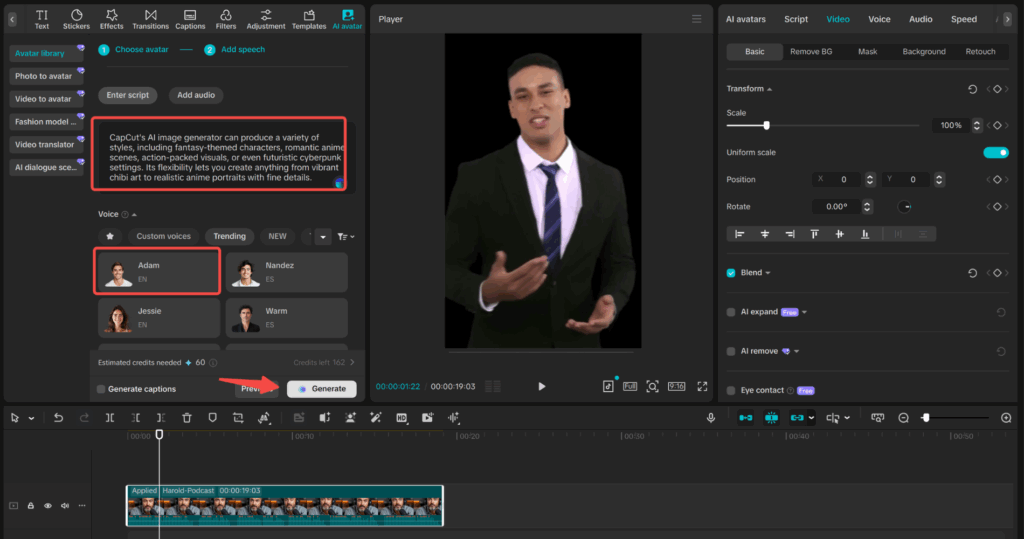
You can also design the appearance of the avatar and modify several settings, such as voice pitch, voice speed, and expression. One can also put eye contact and other animation features to make the avatar more dynamic. The speech shall be synchronised with the actions of the avatar in real time.
After all the arrangements are made, preview the video to see that nothing goes wrong. When you are happy with the changes, press the “Generate” button to have the final avatar video. With this process, you can generate an extensive amount of content, including motivational videos and animated characters with catchy speech.
Step 4: Export Your Training Video
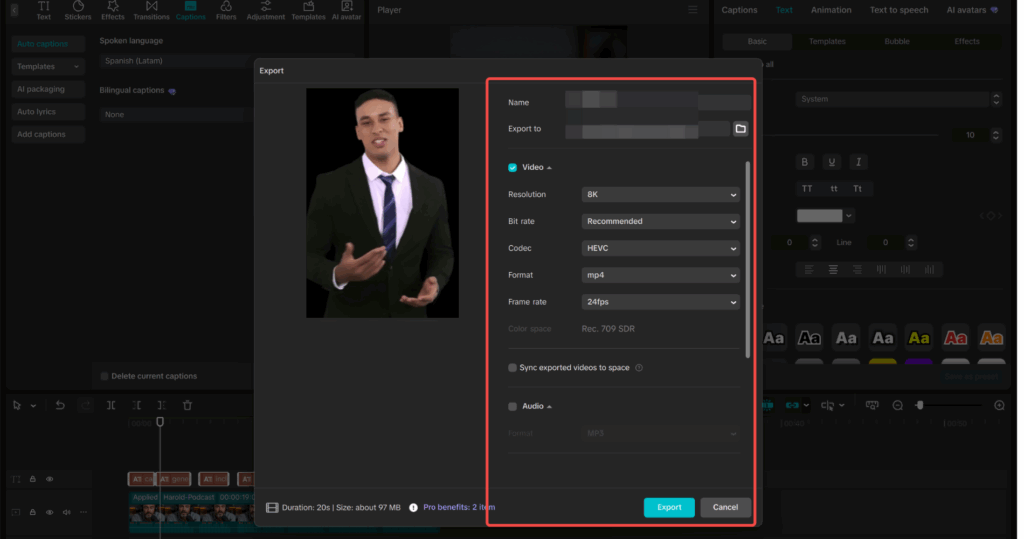
In the upper-right corner, click on the “Export” button, pick a resolution (1080p to post on Instagram or 4K to post on YouTube), rename the file, and select a place to save it. CapCut maximises outputs to fitness platforms with sharp images.
Adding Visuals with AI-Generated Images
The AI image generator provided by CapCut is a supplement to avatars, where individuals design their own pictures, such as exercise illustrations, inspirational posters, or branded thumbnails. You can create pictures in colourful or vivid designs, and then take them to CapCut to make the video more attractive, ensuring the content sticks out in the sea of fitness sites.
Conclusion
CapCut desktop allows fitness professionals to produce inspirational training videos that are motivational and engaging. Through AI avatars providing the narration, trainers can create professional content that the audience will relate to. Create videos that grow in size and become successful in the future by using CapCut today.