When a close call turns into an insurance conversation, you need more than a clip; you need context. You’ve likely felt three pains at once: you struggle to prove where and how fast things happened, you wrestle with slow or fiddly ways to get footage off the camera, and you worry about storage filling up with long drives and parking incidents. Connected dash cams address those issues by pairing GPS for time–place–speed data with Wi‑Fi for safer, faster access to clips, so your record tells the whole story. Toward the end of this guide, you’ll see how Vantrue N4S fits into that picture.
Post Contents
Why Brand Choice Matters
You’ll find many dash‑cam makers, but reputation and product support matter as much as image quality. Vantrue has focused on dependable recording, integrated GPS, and practical parking features while offering firmware updates and app support that help you keep using the hardware longer. If you want an example of a modern three‑channel unit, Vantrue N4S combines high‑resolution coverage with built‑in GPS, wireless access, and large‑capacity storage—features that address the pains you face after an incident.
From Recording to Connected
What Basics Miss
A basic dash cam captures video but rarely answers the questions that decide fault: where the car was, how fast it was traveling, and what unfolded just before and after a key moment. With GPS and smarter access, your footage becomes an incident record you can search and share without rummaging for SD cards. That’s one reason devices like N4S emphasize integrated GPS with video, so your clips carry location and speed alongside the picture.
Why GPS Matters
GPS data adds time‑stamped route, speed, and location to every relevant clip. That context supports your account when stories conflict and helps you reconstruct a sequence of events without guesswork. For routine driving, it doubles as a simple log—handy for business mileage and trip history. In cameras such as N4S, GPS is built in, so you don’t rely on a separate module or cable that can get lost or disconnected.
Why Wi‑Fi Matters
On‑device Wi‑Fi lets you preview, trim, and save the right segment to your phone while parked, cutting down on distractions and eliminating card swaps. Transfers are quicker when you’re close to the vehicle, which makes it more likely you’ll preserve crucial footage right away. You can then share the exact clip you need with family, an employer, or an insurer without having to dump your entire card.
GPS Adds Accountability
Route, Speed, Location
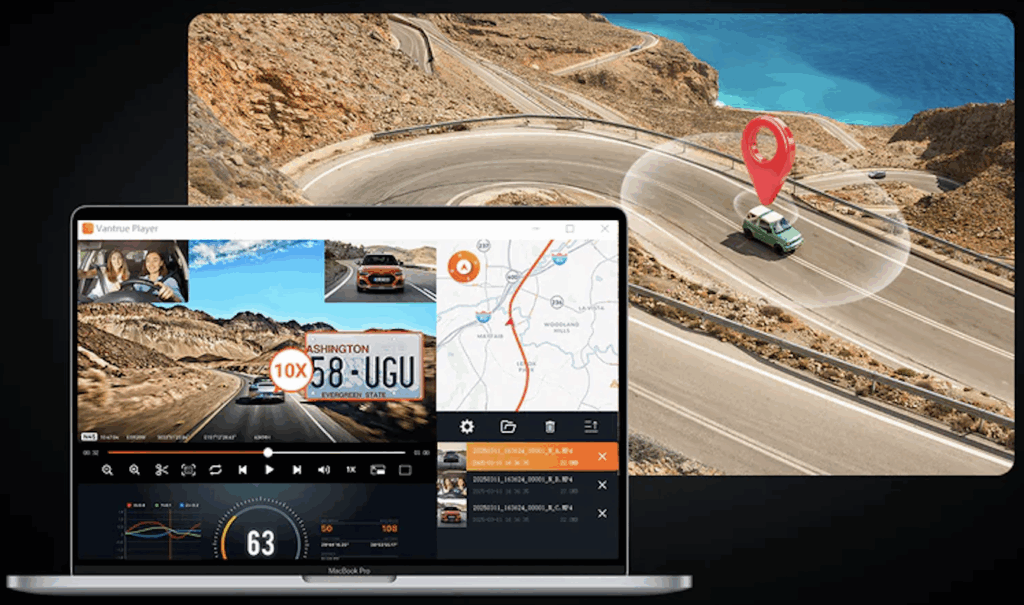
When you review an event, synchronized video, along with route and speed, answers the two big questions—what you saw and what you were doing. That helps validate a safe following distance, confirm a sudden stop ahead, or show you were within the posted limit. For ride‑share drivers or parents, the added accountability can be as valuable as the video itself.
Mileage and Trip History
Trip logs accumulate automatically as you drive, so you can separate personal and business miles, verify timing, and retrace a route later. That’s simpler than keeping a manual logbook and much more reliable than memory.
Claims and Investigations
When claims adjusters or officers ask for details, a clip with matching route and timestamps helps resolve questions quickly. Your footage doesn’t have to do everything; it just has to be clear, authentic, and paired with the right context to move the process forward.
Wi‑Fi Improves Access
2.4 vs 5 GHz
Different Wi‑Fi bands serve different goals. 2.4 GHz tends to reach farther; 5 GHz generally moves data faster at short range. If you often download long clips, standing close to the car for faster transfers saves time and reduces the chance you’ll delay a backup.
| Band | Typical Strength | Common Use |
| 2.4 GHz | Better range, more congestion | Basic connections through walls |
| 5 GHz | Higher throughput, shorter range | Faster clip transfers nearby |
App Review and Sharing
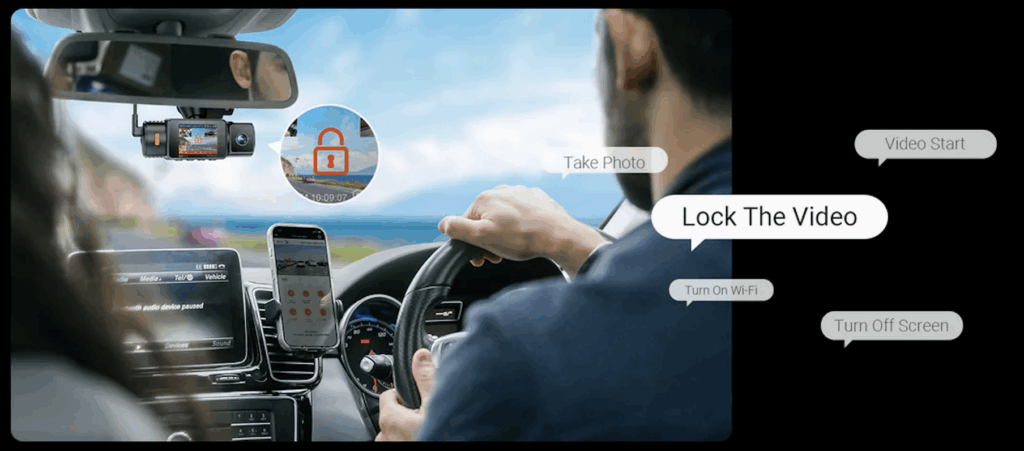
An app workflow lets you scrub a timeline, lock an event, and export precisely the portion that matters. You avoid handling tiny cards or removing the camera from the mount, and you keep your hands free for driving when the car is in motion.
Voice Control and Safety
Some systems recognize basic voice commands for locking or marking clips. Even if you rarely use them, they reinforce safer habits by shifting tasks away from menus and buttons when you should be watching the road.
When GPS and Wi‑Fi Combine
Synced Video and Maps
A good view displays alongside the timeline, along with speed and direction. That unified view reveals patterns you might miss in video alone—merging traffic, lane changes, a sudden brake ahead—so you piece together cause and effect rather than argue over guesses.
Parking Surveillance and Alerts
Parking surveillance captures bumps or motion while the engine is off, preserving the moment that caused a new scratch or dent. Pair that with GPS tags and time data, and you’ll isolate the right clip quickly instead of scanning hours of footage.
Managing Storage
Loop recording overwrites the oldest files once storage fills, while event locking protects important segments. Use a high‑capacity card, and you’ll keep more history without juggling cards. If your camera supports larger cards and buffered parking modes, you’ll have the cushion you need on long trips or busy weeks downtown.
Buying Considerations
Hardware and Power
Decide how many views you need. A three‑channel system (front, cabin, rear) brings complete coverage for carpools, families, and professional drivers. For longevity and heat resistance, supercapacitor‑based power is common in modern designs. If you want true round‑the‑clock parking surveillance, add a hardwire kit with low‑voltage protection.
Mounting and Apps
Look for a secure mount that still releases quickly when you want to remove the unit, plus a flexible joint so you can aim the lens precisely. A well‑maintained app and clear firmware support are just as important as specs, because that software is how you’ll find, lock, and export your clips.
Privacy and Retention
GPS data is sensitive. Decide who gets access, how long you’ll keep clips, and where you’ll store them. Share only what’s necessary, especially if your recordings include other people inside the cabin or on private property.
Conclusion
When you add GPS and Wi‑Fi to a reliable camera, you stop arguing about impressions and start sharing facts. You get a record that shows what you saw, where you were, and how fast you were going—plus a simple way to preserve and send the right moments. If you’re ready to upgrade, confirm the features that solve your pain points—integrated GPS, strong parking modes, easy app access, and ample storage—and consider how Vantrue N4S brings those pieces together without adding extra boxes or complexity.