When too many actions come from the same IP address, platforms start to limit access or block requests. This is where a mobile proxy becomes useful. It routes your traffic through real mobile carrier networks, so requests look like they come from normal users instead of servers. For tasks like managing accounts, running automation, or collecting data, mobile proxies help spread activity across different IPs and reduce repeated connection patterns.
Choosing the right provider matters more than most people expect. Some services offer mobile IPs but fail when traffic increases or when sessions need to stay stable. The best mobile proxy providers focus on IP quality, rotation control, and consistent performance under load. If your setup keeps getting blocked, the first things to check are the IP source and how often it changes. Getting those right usually fixes most problems.
Post Contents
What is a mobile proxy
A mobile proxy is an IP address provided by a real mobile carrier, such as a 4G or 5G network. When you use a mobile proxy, your internet traffic is routed through a mobile device or carrier network instead of your own connection. This makes your requests appear as if they come from a normal smartphone user.
Mobile proxies are different from other proxies because mobile IPs are shared by many real users at the same time. This means platforms often treat this traffic as standard user behavior. For example, if an account gets limited while using one IP, switching to a mobile proxy can help because the connection comes from a different mobile network.
Key characteristics of mobile proxies:
- IPs come from real 4G/5G carrier networks
- Traffic looks like it comes from mobile users
- IP addresses can change naturally when reconnecting
- Often used for account management, automation, and testing
How to choose the best mobile proxy
Choosing the best mobile proxy is not about finding the largest number of IPs. What matters is how stable the connection is, how the IP behaves during sessions, and whether the proxy can handle real workloads without constant interruptions. Many issues with mobile proxies come from poor rotation control, reused IPs, or unstable carrier routing.
Start by looking at how the proxy handles IP changes. Mobile networks naturally rotate IPs, but this behavior should be controllable. If the IP changes too often during a session, platforms may treat it as suspicious. If it never changes, you lose the benefit of distribution. A good mobile proxy lets you balance rotation and stability based on your task.
What to check when choosing a mobile proxy:
- Real mobile carrier IPs (4G/5G) instead of simulated or resold connections
- Rotation control so you can change IPs manually or on a schedule
- Stable sessions for account logins and long-running tasks
- IP quality and reuse rate, to avoid getting flagged due to overused addresses
- Location targeting, especially if you need traffic from specific regions
- Compatibility with automation tools if you plan to run scripts or bots
- Clear pricing structure, so costs remain predictable as usage grows
In practice, most problems come down to two things: the same IP being reused too often or IPs changing at the wrong time. Fix those, and mobile proxies become much easier to work with.
Why App CyberYozh is a strong choice for mobile proxy infrastructure
App CyberYozh is built for teams that rely on stable mobile connections in daily work. It provides access to real 4G/5G mobile carrier IPs backed by a network of 50 million high-quality IPs across 100+ countries, which allows businesses to run account operations, testing, or automation without repeatedly using the same IPs. For social media teams, this means fewer account conflicts. For data teams, it means requests can be distributed across real mobile networks instead of hitting limits from a single source.
The platform also removes a common problem many businesses face. Instead of combining multiple tools for proxies, browser setup, and verification, everything is handled in one place. With built-in fingerprint control, each account can run with its own device and browser profile, which helps avoid accounts being linked together. This is especially useful for agencies, e-commerce teams, and marketing teams that manage multiple accounts or campaigns at the same time.
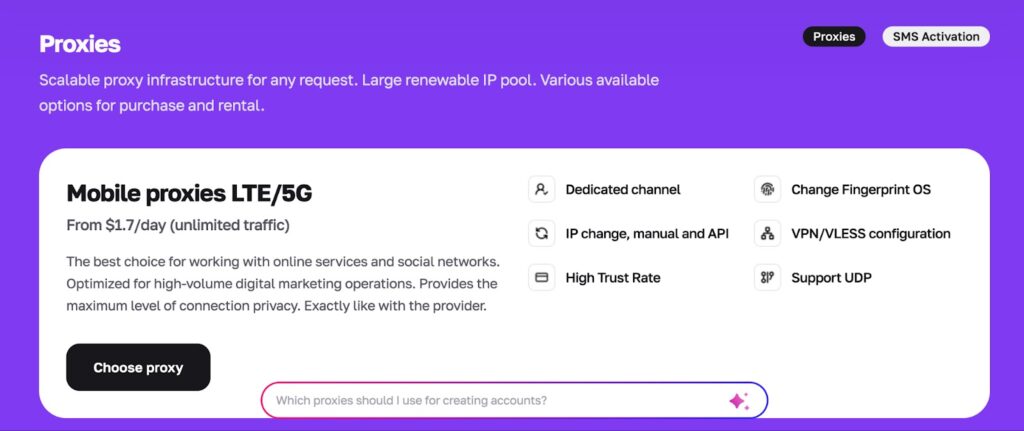
App CyberYozh features
- Access to real 4G/5G mobile carrier IPs for account-based workflows
- Network of 50M+ IPs across 100+ countries for global operations
- Fingerprint control to assign a unique browser and device identity per account
- IP rotation and session control for both automation and stable sessions
- Suitable for social media management, ad testing, scraping, and multi-account setups
- API support for tools like Selenium, Playwright, Puppeteer, Postman, and Scrapy
- SMS activation and phone number rental for account registration
- Fraud-risk checks to validate IPs and numbers before running tasks
- Support for HTTP, HTTPS, SOCKS5, and UDP protocols
- Infrastructure designed for around 99.8% success rate
Pricing
- Mobile LTE/5G proxies: from $1.7 per day with unlimited traffic
- Residential rotating proxies: from $0.9 per GB
- Static residential ISP proxies: from $5.29 per month per IP
- Datacenter proxies: from $1.9 per month per IP
The pricing is flexible, so small teams can start with basic usage, while larger businesses can scale operations without rebuilding their setup or switching providers.
What are the use cases of mobile proxies
Mobile proxies are used when platforms are strict about how traffic looks and behaves. Because they run through real carrier networks, they help reduce flags that often happen with server-based connections. The key is using them in the right context. Some tasks need stable sessions, others need rotation. Mobile proxies can handle both when configured properly.
Managing multiple accounts
When several accounts log in from the same IP, platforms start linking them. This is one of the most common reasons accounts get limited.
Mobile proxies help by assigning different IPs that come from real mobile networks. Since these IPs are shared across many users in normal conditions, activity looks less isolated. This makes them useful for social media teams, community managers, and agencies handling multiple accounts.
Automation and bot workflows
Automation tools send repeated requests. If those requests come from one IP, limits appear quickly.
Mobile proxies spread those requests across different IPs. This reduces the chance of blocks and allows scripts to run longer. The important part is controlling how fast actions are executed. Even with mobile proxies, aggressive automation will still get flagged.
Ad verification and campaign testing
Marketing teams often need to check how ads appear in different locations or devices. Mobile proxies allow traffic to be routed through real mobile networks, which gives a more accurate view of how campaigns perform for mobile users.
This is useful when testing targeting, checking placements, or validating regional differences.
Web scraping and data collection
Some websites treat mobile traffic differently from desktop traffic. In these cases, mobile proxies can help access data that may not be available through other networks.
They are often used for collecting public data, monitoring content, or tracking trends across regions. The key is distributing requests and avoiding repeated patterns.
App and mobile environment testing
Developers use mobile proxies to test how apps behave under different network conditions and locations. Instead of relying on one connection, they can simulate traffic coming from different mobile networks.
This helps identify issues that only appear under specific conditions, such as regional restrictions or network-based behavior.
Final verdict
A mobile proxy becomes useful when platforms start reacting to repeated activity from the same IP. If your setup keeps getting limited, the issue is usually not the tool itself but how traffic is routed and how often the same IP is reused. Mobile proxies solve this by placing your requests inside real carrier networks, which helps distribute activity and reduce obvious patterns.
The key is choosing a provider that gives you control. Stable sessions, clean IPs, and proper rotation matter more than raw numbers. Platforms like App CyberYozh focus on this by combining mobile proxies with fingerprint control and verification tools, which makes it easier to run account workflows and automation without constant fixes.
FAQs about mobile proxies
What is a mobile proxy?
A mobile proxy routes your traffic through a real 4G or 5G carrier network. Instead of using your own IP, your requests appear as if they come from a mobile device connected to a telecom provider.
Why are mobile proxies useful?
They help when platforms limit or block activity from repeated IP usage. Mobile proxies distribute requests across carrier networks, which reduces the chance of being flagged during account management or automation.
Are mobile proxies better than residential proxies?
It depends on the task. Mobile proxies are often used for account-based workflows because mobile traffic is shared between many users. Residential proxies are more common for scraping and long sessions.
Can mobile proxies get blocked?
Yes. If too many actions happen too quickly or if the same IP is reused often, platforms can still detect patterns. Slowing down actions and controlling rotation usually fixes most issues.
How often should a mobile proxy change IP?
It depends on the task. For automation or scraping, rotation can happen frequently. For account sessions, it is better to keep the same IP stable and avoid switching during active use.
Can I use mobile proxies for managing multiple accounts?
Yes, this is one of the main use cases. Assigning different mobile IPs to each account helps prevent accounts from being linked together. Some platforms, like App CyberYozh, also combine this with fingerprint control to improve separation between accounts.
What should I check before choosing a mobile proxy provider?
Focus on:
- Real carrier IPs (4G/5G)
- IP quality and reuse rate
- Rotation and session control
- Stability during long tasks
- Clear pricing and scaling options
If these are not handled properly, most proxy setups will run into limits regardless of the provider.