Most people treat Instagram like a stage, but treating it like a group chat with a guest list is where the feature actually shines. The Close Friends feature on Instagram quietly turned my over-curated grid into something I actually enjoy posting to, and the difference took less than a week to feel.
I started digging into this after watching a creator friend post messy, honest stories for a tiny circle while her public feed stayed polished. It clicked for me. Now I have a small group that gets the unfiltered version of my day, and a public profile that looks the way I want strangers to see it. This guide covers how to set it up, what to actually post there, the small etiquette rules nobody writes down, and answers to the questions I see asked most often.
Post Contents
The Awkward Group Chat Moment That Made Me Try This
I used to dump everything on my main story. Gym selfies, ranty voice notes, half-edited memes, food pics, the works. The problem? My boss follows me. So does my landlord. And a cousin who screenshots literally everything.
After a slightly embarrassing moment at a friend’s birthday dinner, I sat on my couch scrolling through my own followers list and realized I had nearly a thousand people on there but only spoke to maybe 20 regularly. That’s when I tapped into Close Friends for the first time. I expected a clunky setup. It was actually done in under three minutes.
What Close Friends Actually Is (Without the Marketing Spin)
In plain language: it’s a private list inside Instagram. Anything you post to Close Friends, whether a story, a reel, a feed post, or a note, only those people can see. Everyone else has no clue it exists.
The green ring around your avatar when a Close Friends story goes live is the visual cue. Anyone else opening the app simply sees nothing where that story would be, as if you never posted at all.
A few things worth knowing up front:
- People you add don’t get a notification, but they can see they’re on it (the green ring on your story is the giveaway).
- You can add or remove anyone, anytime, and they’re not told either way.
- It’s one-way. Just because you added them doesn’t mean you’re on theirs.
- Only you can see your full list. No one else gets a peek.
- You can have only one Close Friends list per account, but you control the size and the membership.
That last point is the one that made me relax a bit. No one is pulling up a public leaderboard of who you trust most. You set the rules.
Setting It Up on My iPhone — Faster Than I Thought
I did this on my iPhone 13, but the process works the same on any iOS or Android version of the app. I’d recommend doing it when you have ten quiet minutes, because picking who’s “in” actually takes more mental energy than the technical part.
Here’s how I did it:
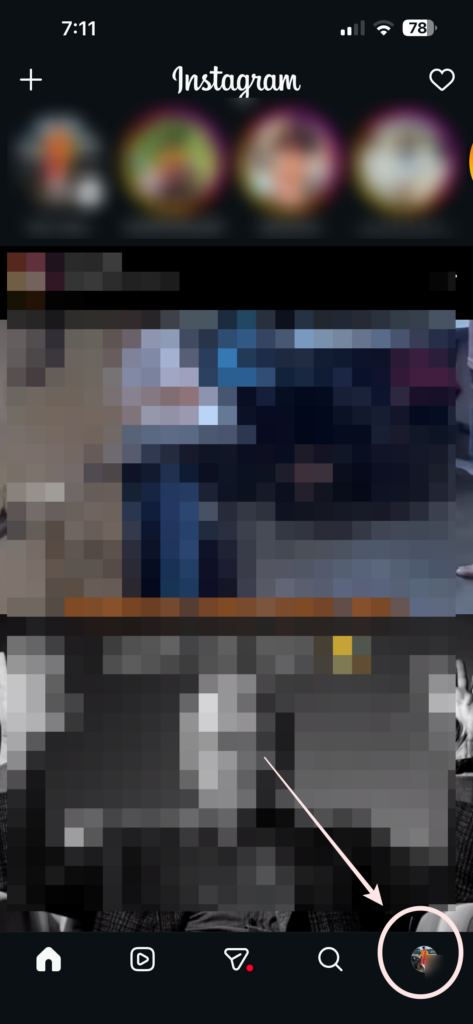
1. Open Instagram and tap my profile picture in the bottom right.
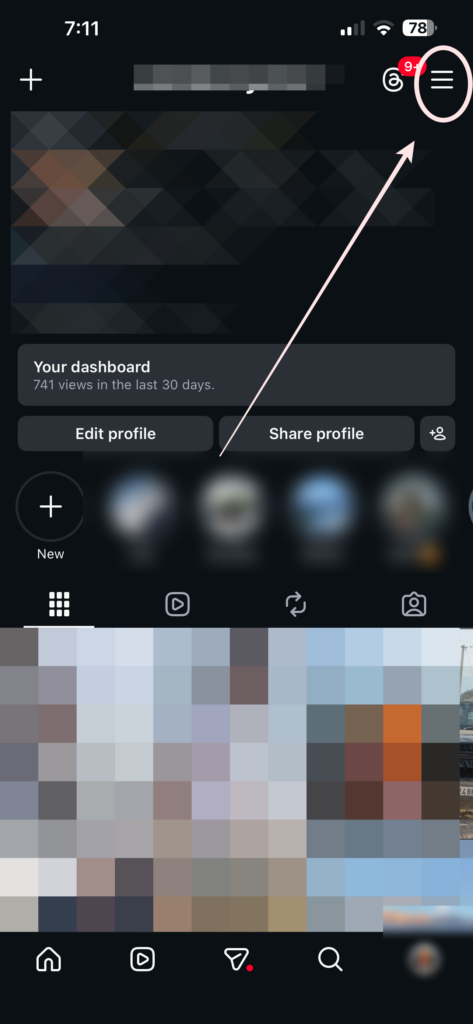
2. Tap the three lines (☰) in the top right corner.
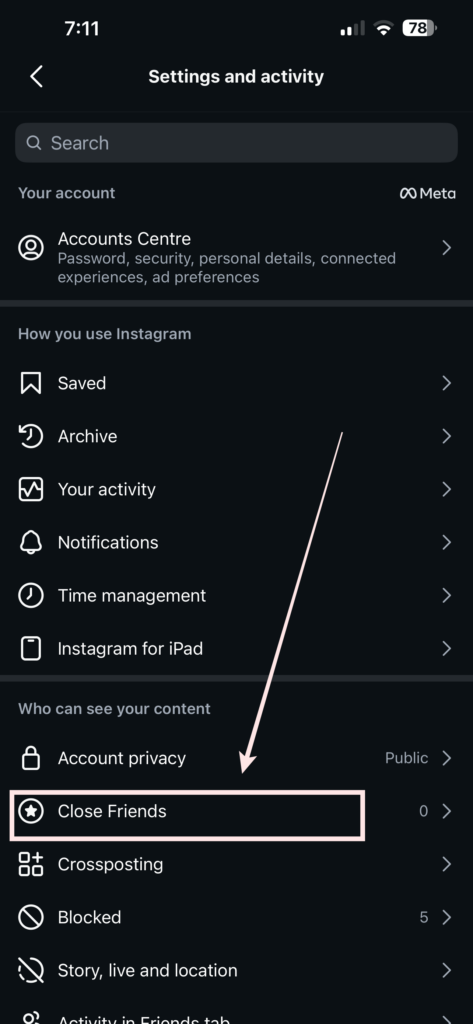
3. Hit Close Friends from the menu.
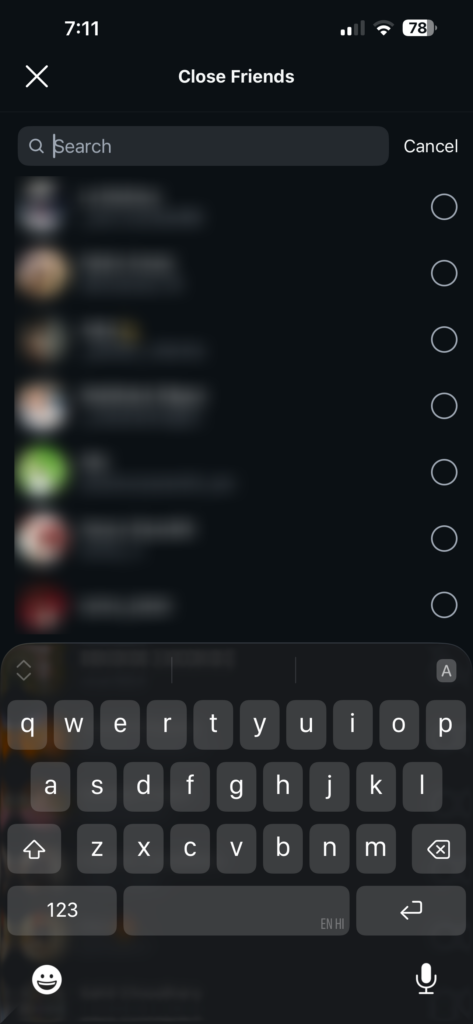
4. Search and tap usernames to add them. A green checkmark shows up next to each one.
5. Tap Done in the top right.
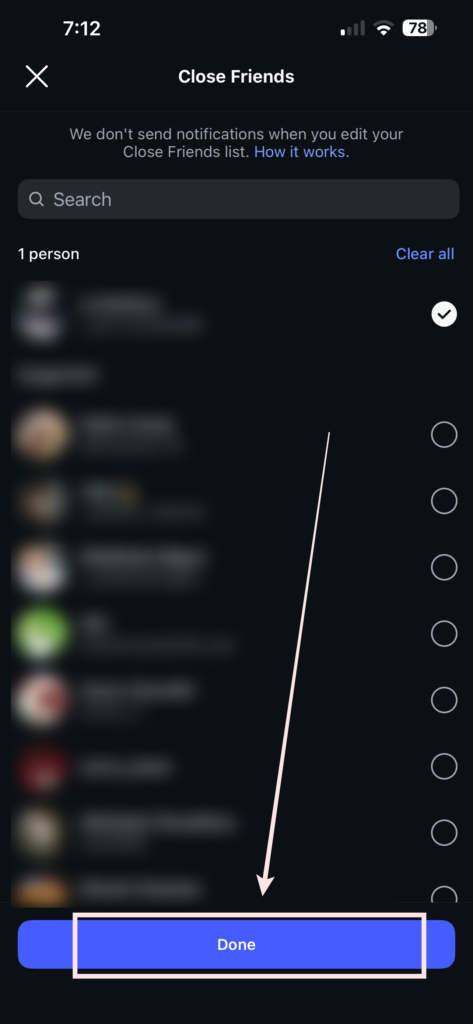
That’s literally it. No confirmation email, no scary “are you sure?” popup. From here, you can come back to that same menu anytime to add or remove people as your life shifts.
Adding People Without Making It Weird
This is the part nobody talks about. The technical setup is easy. The social part is where it gets sticky.
My first instinct was to add anyone who had ever DM’d me. That was a bad idea. I ended up with around 80 people on the list, which kind of defeats the point. After a week I trimmed it down to around 22, and that’s the number that finally felt right.
A simple filter I now use before adding someone:
- Would I text them about something annoying that happened today?
- Would I show them a meme in person?
- Would I be okay if they screenshotted my story?
If even one answer is “ehh, not really,” they don’t make the cut. Trust beats length every time.
The Real Use Cases I Actually Lean On Now
Over the past year, I stopped thinking of Close Friends as a “secret mode” and started using it for specific, repeatable situations. These are the ones that stuck and that I keep coming back to.
1. Unfiltered fitness updates I track my lifts and weight openly with my close friends, including the bad weeks. On main, that level of detail just feels like oversharing. The Close Friends feed post option makes it easy to share without broadcasting.
2. Travel logistics in real time When I’m on a trip, I post boarding passes, hotel hallways, weird taxi rides, the messy travel diary stuff I’d never put publicly because of location safety. Close Friends gets the unedited version, and nobody outside my circle ever sees it.
3. Asking for quick opinions “Is this shirt okay?” “Should I reply or wait?” Those go to Close Friends. I get five honest answers from a private audience instead of zero useful ones from the void.
4. Venting the productive kind Bad day at work? A quick voice-over on a black screen to my Close Friends gets it out of my system without performing it for everyone. The green ring is a built-in filter for honesty.
5. Sharing wins I don’t want to brag about publicly Got a freelance client, finally hit a savings goal, finished a side project. Close Friends gets to celebrate with me without it looking like I’m flexing on the main grid.
6. Trying out a close friends reel Before publishing a reel to my full audience, I drop it on Close Friends first to gauge reaction. It’s basically a focus group of people I trust, and the feedback is always sharper than a public comment section.
7. Notes that aren’t for the world Instagram Notes disappear after 24 hours anyway, but I still use Close Friends for the slightly more candid ones. It’s a habit that keeps my default sharing a little tighter.
Posting a Story Just for Close Friends
This is the most common use, and once you build the habit it takes two seconds. Here’s exactly how I do it from my iPhone every time.
- Swipe right from the home feed to open the camera.
- Snap a photo or pick from gallery.
- Edit it (text, stickers, music, same as normal).
- Instead of tapping the regular Your Story button at the bottom, tap the green star icon labeled Close Friends.
- The post goes up with a green ring around your avatar instead of the usual rainbow gradient.
The first time I did this I hovered over the button for a solid 10 seconds because I was scared I’d accidentally publish to public. You can’t. The two buttons are clearly separated, and the green star is its own distinct tap target.
Sharing a Post (Not Just Stories) With Close Friends
Instagram quietly added the option to share regular feed posts to Close Friends only, and I missed it for months. Now I use it for posts I’d be a bit embarrassed to keep on my grid forever, the half-formed thoughts, the small wins, the photos that matter to my people but not to the algorithm.
A close friends feed post works almost exactly like a normal post, with one small switch at the share screen.
- Compose your caption and image as usual.
- Right above the Share button, you’ll see a toggle that says Share to Close Friends only.
- Flip it on. The post will only appear in the feed of people on your list, and it gets a little green badge so you can tell at a glance which posts are private when scrolling through your own profile.
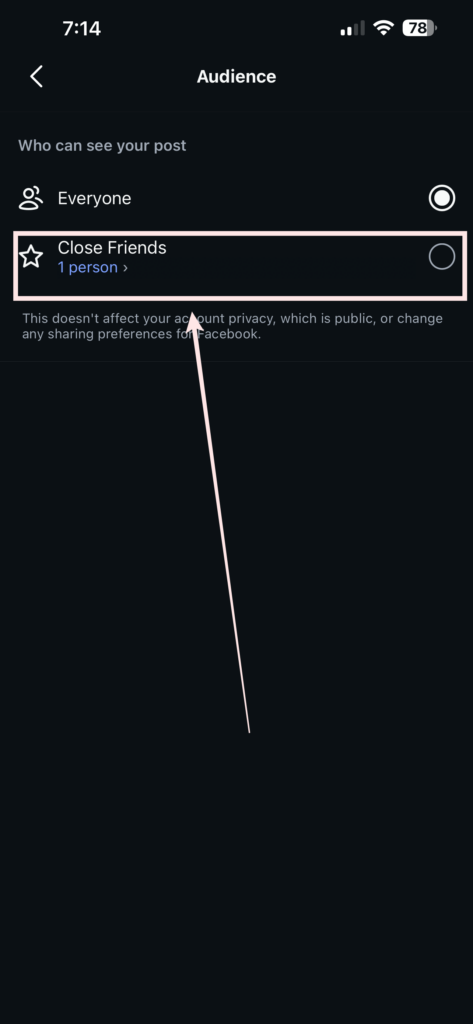
Reels work the same way. Before you tap Share on a close friends reel, scroll to the audience selector and choose Close Friends. The reel still lives on your profile, but only the people you’ve added will actually see it show up in their feed.
Close Friends Etiquette: The Unspoken Rules
Once the list is set up, the harder question is the social one: how do you use it without stepping on toes? After months of using this feature, and reading what other people get wrong, here’s the etiquette I try to follow.
Keep the list small. A list of 100 is basically a public story with extra steps. Aim for the people you’d actually call in an emergency, not the people you met twice and thought were nice.
Don’t advertise who’s on or off the list. If a friend finds out they’re not on your Close Friends, that’s awkward for both of you. Same goes for the reverse. Treat the list like a quiet default, not a status symbol.
Skip the promos. People are on your Close Friends because the vibe is personal. Pushing side hustle offers, affiliate links, or sales pitches into that space breaks the unspoken contract.
Watch your posting volume. Just because the audience is private doesn’t mean they want eight stories before lunch. If your close friends start replying with “okay, a lot today,” that is your signal to pull back.
Assume screenshots exist. Even with people you trust, treat every Close Friends story like it could end up in another group chat. If that thought makes you uncomfortable, don’t post it.
Don’t take removal personally. People trim lists all the time. If you notice a friend’s green ring vanish from your view, it’s usually about their comfort, not yours.
The Mistake I Made With My First Close Friends List
I added my work-friend group without thinking it through. These are people I genuinely enjoy, but they’re still colleagues. So when I posted a slightly snarky story about a Monday meeting, two of them saw it. One of them mentioned it during stand-up the next morning. Nothing bad happened, but I felt the floor go warm under my feet.
Lesson learned: Close Friends should be the people you’d be comfortable being awkward around in real life. Not just people you like. There’s a difference, and that difference is exactly what this feature is built for.
I removed all of them that evening. They never knew. That’s the quiet magic of this list, and it’s also why the etiquette around it matters.
Things I Tried That Didn’t Work the Way I Expected
Not everything was a clean win. A few habits I tested and dropped after seeing how they played out.
- Using it as a “broadcast channel” for promos. I run a couple of side projects and tried pushing offers to my Close Friends list. It felt off. People are on that list because the vibe is personal, not promotional.
- Adding back people I removed weeks later. I thought “oh they’re cool again,” but if I had to remove them once, the same friction usually returns. Now I trust the first instinct.
- Posting too much. I went from one story a day to six because the audience felt safer. My friends started replying with “okay, too much info.” Fair point. I dialed it back.
- Treating it as a private group chat replacement. The list is one-way and silent. For real back-and-forth, I still use DMs. Close Friends is for broadcast-style sharing, not conversation.
Small Tricks I Wish I Knew Earlier
A few things I picked up over months of using this feature that I rarely see mentioned anywhere.
- You can hide your story from specific people AND post to Close Friends at the same time. Belt and suspenders, but useful for sensitive stuff.
- The list updates instantly. Add someone right before posting and they’ll see the story you just published.
- Removed people stop seeing your Close Friends posts immediately. Not at the end of the day, not after refresh. Right then.
- Highlights from Close Friends stories stay private. If you save a Close Friends story to a Highlight, only those same Close Friends can see it later.
- You can set who can reply to your Close Friends stories under story privacy settings. I keep mine to “people you follow back” for an extra layer.
- Multiple accounts on the same phone keep separate lists. Your personal and business accounts don’t share Close Friends, which is great for keeping work and life clearly split.
Before vs After: How My Posting Habits Changed
Before Close Friends:
- I posted around 2 stories a week, all heavily filtered.
- I deleted maybe 1 in 3 because I’d second-guess myself.
- DMs from random followers I barely knew were a constant thing.
- I avoided posting anything with my real face if I’d had a long day.
After using Close Friends seriously:
- Main grid: more curated, less frequent, almost portfolio-like.
- Close Friends: 4 to 5 stories a day, completely unfiltered.
- DMs from strangers dropped because they see less of my life.
- My replies from actual friends went up, way up. Real conversations, not just emoji reacts.
Honestly, the side effect I didn’t expect was that Instagram became fun again. It stopped feeling like a stage and started feeling like a small room with people I actually like.
Should You Bother? My Honest Take
If you have more than 200 followers and even one of them makes you slightly censor yourself, yes. The Close Friends feature on Instagram is genuinely the easiest privacy upgrade I’ve made in years, and it took me about 4 minutes to set up.
The only people I’d say don’t need it are folks running purely public accounts (creators, brands, public figures). For everyone else, especially if your follower list has slowly turned into a mix of family, exes, coworkers, and that one guy from college you don’t remember adding, it’s worth ten minutes of your evening.
If you’re a creator who’s been hesitant because you think it splits your audience, try this: keep your public content for the algorithm, and use Close Friends for the behind-the-scenes stuff your real supporters will love. The two channels end up reinforcing each other.
Final Thoughts After Using This for Months
I went into Close Friends thinking it was a vanity feature, a status thing. Turns out it’s the opposite. It’s the closest Instagram has come to feeling like a normal group chat in years. My main feed went back to being a clean, lightly curated space, and my Close Friends became the place where I actually feel like myself.
Looking back across the past year, the feature has quietly become one of the most useful parts of how I use Instagram. The green ring is no longer a novelty, it’s a habit. I post to a private audience when something is real, and I post publicly when I want it to be a record. The two spaces serve different purposes, and that’s the whole point.
If I were starting over today, I’d build the list with five people first and add slowly. That’s the version of advice I wish someone had given me when I started. Trust your gut on every name, keep the circle small, and let the list earn its way wider over time. The feature rewards patience, not speed.
That little green ring around my avatar? It’s done more for my online sanity this year than any digital detox ever did.
Frequently Asked Questions
How does Close Friends on Instagram work?
Close Friends is a private list you build inside Instagram. When you post a story, reel, feed post, or note to Close Friends, only the people on that list can see it. Everyone else sees nothing, as if you never posted. Only you can see your full list, and people are not notified when they get added or removed.
Can anybody see your Close Friends list on Instagram?
No. Your Close Friends list is completely private. Nobody else, including the people on the list, can see who else is on it. You are the only person with access to the full list, which removes any social pressure to curate it in a particular way.
How do I know if I am on someone’s Close Friends list?
You can’t see a list, but you can spot the signs. When someone posts a Close Friends story, their avatar gets a green ring around it in the stories tray. If you regularly see that green ring on a friend’s avatar, you’re on their list. If you never see it, you’re not.
Can I add non-followers to my Close Friends list?
No. Close Friends only works with people who follow you. If someone doesn’t follow your account, they won’t be able to see your Close Friends stories, posts, or reels, so adding them to the list does nothing. Follow each other first, then build the list.
How do I post a story to just Close Friends?
Open the story camera, take or select your photo or video, then look for the green star icon at the bottom of the share screen. Tap Close Friends instead of Your Story, and the post goes up with a green ring around your avatar. Only your list will see it.
Can I have more than one Close Friends list on Instagram?
No. Instagram currently supports only one Close Friends list per account. If you want to share different content with different groups, you have to manually adjust the list each time, or use the Hide Story From feature to keep certain people out of specific public stories.
Will someone know if I remove them from Close Friends?
No. Instagram does not send a notification when you remove someone from your Close Friends list. The only signal is that they will stop seeing your Close Friends stories and posts. If they were paying close attention to your green rings, they might notice the change, but there is no alert or message.
How many people can I add to my Close Friends list?
Instagram does not publish a hard limit, but the feature works best with a small group, typically under 50. The smaller the list, the more personal the experience feels for both you and the people on it. A list of 100 or more starts to feel like a public story with extra steps.