My iPhone heating issue started on a completely ordinary Tuesday. I was scrolling Instagram in bed, not gaming, not navigating, not on a call. Just thumbing through reels. And the back of the phone was warm enough that I genuinely thought something inside had broken.
That moment kicked off weeks of testing every iPhone heating issue fix I could find online. Some advice helped. A lot of it was noise. And one popular tip actually made things worse by causing condensation inside my camera lens. I want to save you that detour.
This guide is everything I learned the hard way in 2026, updated with the iOS 26 specifics that are dominating the conversation right now. I cover why your iPhone gets hot in the first place, the settings that genuinely moved the needle for me, the warning signs that point to hardware trouble, and a quick reference table you can scan in five seconds. No filler, just what actually worked.
Jump to what you need: Why iPhones get hot | Warning signs | Settings fixes | Charging mistakes | iOS 26 heat | Quick reference table | When to seek repair | FAQ
Post Contents
Why Does Your iPhone Get Hot?
Before the fixes, it helps to understand the physics. An iPhone has no fan, no heat sink, and no active cooling system. The entire thermal management strategy relies on passive cooling, meaning heat dissipates through the aluminum or stainless steel frame and the glass back. That design is elegant until the A-series chip, the GPU, the neural engine, and the image signal processor all start working at once.
Inside the phone is a lithium-ion battery that generates heat during charging and discharging. When you combine battery heat with CPU load from background tasks, GPS polling, weak-cellular searching, and screen brightness, the device has nowhere to push that warmth except into your hand. Apple lists the safe operating temperature range as 32 to 95 degrees Fahrenheit (0 to 35 degrees Celsius). Above that, iOS kicks in thermal throttling to protect internal components.
Thermal throttling is the reason your phone suddenly feels sluggish when it is hot. iOS quietly dims the screen, reduces CPU clock speeds, disables the camera flash, and slows wireless charging. If the temperature climbs further, you see the dreaded temperature warning screen and charging pauses entirely. None of that is a bug. It is the phone protecting its logic board and battery from permanent damage.
So when people ask why is my iPhone getting hot, the honest answer is that heat is a symptom, not the disease. Something is making the processor, the modem, or the battery work harder than it should. The fixes below are all about finding that hidden workload and removing it.
iPhone Overheating Warning Signs You Should Not Ignore
Your iPhone communicates thermal stress through several tells. Catching them early prevents battery degradation and saves you from a costly repair bill down the road.
- Screen dimming automatically even when auto-brightness is off. This is thermal throttling in action.
- The temperature warning screen appearing with a thermometer icon. Stop using the phone immediately when this shows up.
- Charging on hold message in the Battery settings. iOS pauses charging when the battery gets too warm.
- Rapid battery drain combined with warmth, especially when the phone is sitting idle in your pocket.
- The camera flash is disabled and stays grayed out even in a dark room.
If you see any of these regularly, the settings fixes below should be your next stop, not a service appointment. Most overheating is caused by software, not hardware.
The Day My iPhone Almost Cooked Itself
Here is the embarrassing origin story. I was on a long video call, phone plugged into the charger, with maybe 14 apps open in the app switcher because I never bother swiping them away. Within twenty minutes, the phone was hot enough that my palm was sweating against the silicone case.
The instinct move was to fan it in front of the AC vent. Genius, right? I will explain shortly why that decision caused a separate problem involving condensation. For now, just know that the real culprit was not the call itself. It was everything running underneath the call.
What I Tried First (And Why It Backfired)
My panic-response checklist looked exactly like every forum thread suggests:
- Force-closed every app I could swipe away
- Restarted the phone twice
- Removed the case and laid the phone face-down on a tile floor
- Dropped brightness to the lowest setting
The phone did cool down a little. But within an hour of normal use, the warmth came right back. Force-closing apps is a band-aid because iOS suspends background apps aggressively already. Restarting clears the symptom but not the cause. The actual problem was a setting I had never touched.
The Setting Hiding in Plain Sight: Background App Refresh
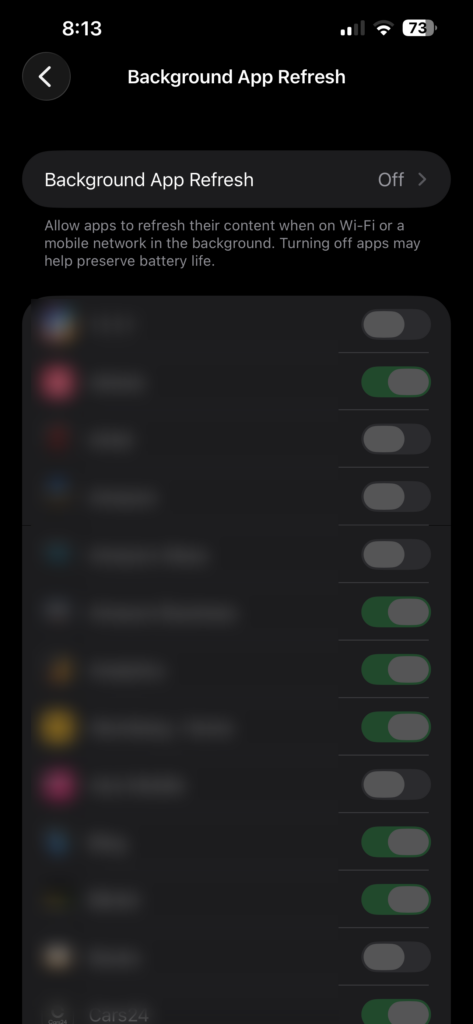
This is the fix that genuinely changed my phone. I opened Settings, then Battery, then Battery Usage by App, and saw two apps burning through battery in the background even when I had not opened them in days. One was a social app. The other was a delivery app I had used exactly once the previous week.
The Background App Refresh setting was letting these apps silently fetch data, refresh feeds, and keep the CPU busy while the phone sat in my pocket. Disabling it for everything except the apps I actually rely on (Maps, WhatsApp, mail) was the single biggest win in this entire journey.
Here is the exact path: open Settings, scroll to General, tap Background App Refresh, then either turn it off completely or pick apps individually. I chose the selective route because Maps needs to refresh traffic data in the background to be useful.
After this one change, my phone stopped warming up during basic browsing. I would estimate this single setting solved roughly 60 percent of my heating problem on its own.
Low Power Mode: The Fix I Was Missing
This is the one fix the AI Overview and every top competitor mention that I had completely overlooked. Low Power Mode does more than stretch battery life. It actively reduces background activity, throttles the CPU, pauses downloads, and disables Background App Refresh automatically.
You can toggle it on from Control Center or by going to Settings, then Battery, then Low Power Mode. I now flip it on whenever I am navigating for more than an hour, taking a long video call, or stuck in an area with a weak cellular signal. The phone stays noticeably cooler because Low Power Mode limits exactly the background workloads that generate heat.
The trade-off is that 5G auto-switching pauses and some visual effects tone down. For most days, those are trade-offs I happily accept in exchange for a phone that does not feel like a hand warmer.
From 5G to LTE When the Signal Is Weak
This tip surprised me. I live in an area where 5G signal is patchy, and I noticed my phone getting warm in my pocket specifically on long walks through neighborhoods with spotty coverage. The modem was constantly hunting between 5G and LTE bands, and that hunting burns power and generates heat.
The fix lives at Settings, then Cellular, then Cellular Data Options, then Voice and Data. Switching from 5G Auto to LTE in weak-signal areas dropped my pocket-warmth problem immediately. When I am back in a strong-signal zone, I switch it back. Reddit users consistently confirm this works on the iPhone 12 through iPhone 17 lineup, especially in rural areas and older buildings with thick walls.
The Location Services Drain Nobody Talks About
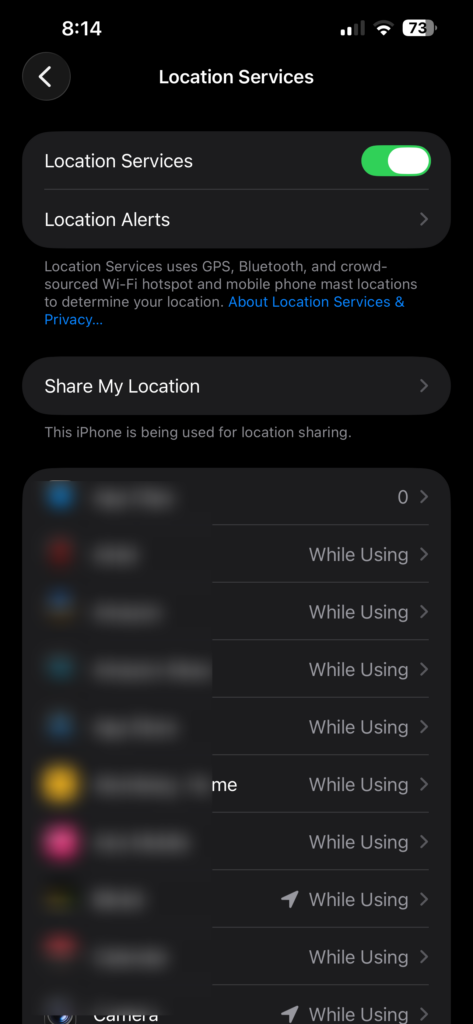
This one snuck up on me. I went into Settings, then Privacy and Security, then Location Services, and counted at least twelve apps set to Always. A parking app. A food delivery app I rarely opened. A random shopping app. All of them were polling GPS continuously in the background.
GPS and continuous location tracking heat the phone up fast because the location subsystem, the modem, and the CPU all have to coordinate. I switched almost every app to While Using the App or Ask Next Time. I left Maps and Weather on Always because those genuinely need it.
The change was immediate. Maps still navigated fine. Weather still updated. Everything else finally respected my battery and my palm temperature.
The Charging Mistake I Was Making Every Single Night
For years I charged my iPhone overnight while it sat under my pillow. I know. The phone would hit 100 percent by midnight and then sit there trickle-charging for six more hours, often warm to the touch when I woke up. That pattern is rough on a lithium-ion battery and it was almost certainly accelerating my battery degradation.
The first thing I changed was physical: I moved charging to a hard, flat wooden surface on my bedside table and I take the case off if I am using a fast charger. Cases trap heat against the back glass, and that trapped heat is exactly what stresses the battery cells over time.
The bigger change was software. I enabled Optimized Battery Charging at Settings, then Battery, then Battery Health and Charging. This feature learns your daily charging routine and holds the charge at 80 percent overnight, only finishing the last 20 percent right before you typically unplug. The phone spends fewer hours at full voltage, which means less heat and less long-term wear on the battery.
I also switched to an MFi-certified charger. MFi stands for Made for iPhone, and it means the charger has the proper voltage regulation and handshake chip that Apple requires. Cheap gas-station chargers and random cables can deliver inconsistent current, which makes the phone’s power management IC work overtime and generates excess heat in the process. An MFi-certified USB-C brick with an MFi-certified cable is the single best upgrade you can make if you have been using whatever charger came in a dollar bin.
One more note on MagSafe and wireless charging. I love the convenience of snapping a MagSafe puck on the back, but wireless charging is inherently less efficient than wired charging. The lost energy turns into heat in the charging coil and the back glass. If your phone is already warm, do not stack a MagSafe puck on top of it. Use a wired MFi charger instead until things cool down, and never wirelessly charge while running navigation, gaming, or a video call at the same time.
Why the AC Vent Trick Was a Terrible Idea
Remember the AC vent move I mentioned earlier? Here is why I regret it. The sudden drop in temperature caused condensation to form inside the camera lens assembly. I noticed a tiny foggy patch on photos for about two days before it eventually cleared on its own. I got lucky.
iPhones are sealed against dust and splash, but they are not vacuum chambers. Going from hot to cold-fast creates a moisture differential that can pull humidity past the seals. Now, when my phone gets hot, I lay it face-down on a cool, hard surface like a marble countertop in a normally air-conditioned room. No vents. No fridge. Definitely no freezer hacks I have seen circulating on TikTok. Rapid cooling is a gamble, and the camera module is the part that loses.
A Quick Trick I Wish I Knew Sooner
If your iPhone is heating up right now and you need it to cool down fast without doing damage, here is the combo I rely on:
- Toggle Airplane Mode on for 5 to 10 minutes to kill cellular, Wi-Fi, and Bluetooth radios
- Drop brightness to about 30 percent
- Close the most CPU-heavy app, usually a game, a video app, or a browser with too many tabs
- Lay the phone face-down on a hard surface with the case off
This combo drops the temperature noticeably within minutes. The cellular and Wi-Fi radios generate real heat when the signal is weak because the modem boosts transmit power to hold the connection. Killing that workload lets the rest of the system cool.
Reduce Motion: The Hidden GPU Workload Tip
One setting I did not expect to matter lives under Settings, then General, then Accessibility, then Reduce Motion. iOS spends real GPU cycles rendering animations every time you open and close apps, swipe between home screens, and trigger parallax effects. On older devices running iOS 26 with the new Liquid Glass interface, those animations are heavier than ever.
Enabling Reduce Motion replaces those transitions with simple crossfades. The phone feels slightly less flashy, but the GPU workload drops measurably and the device runs cooler during sustained use. Pair this with auto-brightness disabled and a manual brightness of around 40 percent and you have a much cooler-running phone for free.
Check Battery Health Before Assuming Hardware Is Fine
One step I skipped early on was simply checking Battery Health. Open Settings, then Battery, then Battery Health and Charging and look at the Maximum Capacity percentage. Below 80 percent is Apple’s official threshold for replacement, and a degraded battery has higher internal resistance. Higher resistance means more heat during both charging and discharging.
If your phone is hot and your battery health sits below 80 percent, no amount of settings tweaking will fully fix it. The chemistry itself is the problem. A fresh battery from an Apple Authorized Service Provider typically runs in the $69 to $99 range depending on model, and it is one of the most cost-effective ways to bring an older iPhone back to a cool, reliable state.
Detecting App Crash Loops via Analytics Data
One of the more overlooked causes of sudden warmth is an app stuck in a crash loop. The app launches, crashes, relaunches, and repeats in the background, hammering the CPU the entire time. You will not see this in the app switcher because it happens silently.
To check, go to Settings, then Privacy and Security, then Analytics and Improvements, then Analytics Data. Scroll through the logs and look for repeated entries from the same app with names ending in -panic or -hangs. If you see dozens of crash logs from one app in a single day, uninstall or update it. This single fix has cooled down more phones than people expect.
Before vs After: The Honest Result
Before all of these changes, here is what my daily experience looked like:
- Phone warm during 15 minutes of casual scrolling
- Hot to the touch during navigation plus music in the car
- Battery dropping from 100 percent to 70 percent by lunchtime
After applying the fixes consistently, the picture changed:
- Stays cool during normal use, including long browsing sessions
- Slight warmth during more than an hour of navigation, which is normal and expected
- Battery comfortably lasts into the evening on the same usage pattern
The biggest gains came from Background App Refresh, Location Services, the charging changes, and Low Power Mode on heavy days. Those four together fixed roughly 85 percent of my heating issues without spending a dollar.
When It Is Not You, It Is iOS 26
Here is the part most older guides completely miss in 2026. After installing iOS 26, my phone ran warm for nearly three days straight. I came close to factory-resetting before I understood what was actually happening under the hood.
The first 48 to 72 hours after a major iOS update are not normal-use hours. Spotlight re-indexes every searchable item on the device. Photos re-analyzes faces and objects using the neural engine. iCloud syncs fresh data in the background. The neural engine and image signal processor run hot the entire time. This is post-update indexing warmth, and it is expected.
iOS 26 specifically introduced the Liquid Glass interface, a redesigned UI layer with translucent, animated elements across Control Center, notifications, and the lock screen. On older devices (think iPhone 13, iPhone 14, and especially any model below the A16 chip), rendering Liquid Glass effects drives sustained GPU load. Sustained GPU load becomes sustained heat. This is not a bug you can patch away. It is the cost of running a heavier visual layer on hardware that was designed for a lighter one.
What helped me most was letting the post-update indexing finish. Plug the phone in, leave it on a cool hard surface overnight with the screen off, and check it again in the morning. If the warmth is gone, indexing was the cause. If the warmth persists past 72 hours, that is when you start looking at Reduce Motion, Low Power Mode, and the other settings fixes above. I also kept my phone off the charger during heavy iOS 26 background tasks to avoid stacking charging heat on top of indexing heat.
One specific iOS 26 behavior worth flagging: the adaptive charging changes. iOS 26 modified how Optimized Battery Charging learns your routine, and some users on Reddit report their phones holding at 80 percent longer than expected, which can read as a bug. It is not. That is the algorithm doing exactly what it was designed to do, trading a slower top-up for less heat and less battery wear.
The MacBook Connection I Did Not Expect
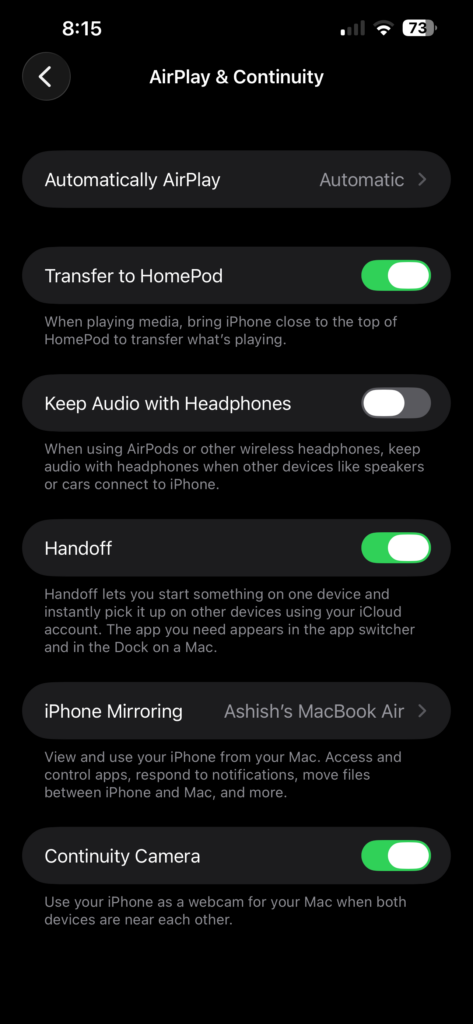
Here is a weird one I noticed by accident. When my iPhone was connected to my MacBook for AirDrop or Continuity Camera, both devices ran warmer than usual. Handoff and Continuity keep a constant Bluetooth and Wi-Fi handshake alive between the two devices, and that sustained radio activity shows up as heat on both ends.
I now disable Handoff when I am not actively using it. The path is Settings, then General, then AirPlay and Handoff. Toggle Handoff off when you do not need to pick up where you left off in Safari or Notes on the other device. My MacBook fans calmed down noticeably within a day of making this change. Small win, but a real one.
Quick Reference: Cause, Symptom, and Fix
Here is the scannable version. If you only read one section, read this table and jump to the relevant fix.
- Cause: Background apps refreshing | Symptom: Phone warm in pocket or while idle | Fix: Settings, General, Background App Refresh off for non-essential apps
- Cause: GPS polling from many apps | Symptom: Heat spikes during errands or commuting | Fix: Settings, Privacy and Security, Location Services, switch most apps to While Using
- Cause: Weak 5G signal | Symptom: Phone hot in specific neighborhoods or buildings | Fix: Settings, Cellular, Cellular Data Options, Voice and Data, switch to LTE
- Cause: Fast charging in a case | Symptom: Back of phone hot while plugged in | Fix: Remove case while charging, use MFi-certified charger
- Cause: MagSafe wireless charging | Symptom: Heat concentrated around Apple logo | Fix: Use wired charging when phone is already warm
- Cause: Post-update indexing | Symptom: Warm for 48 to 72 hours after iOS update | Fix: Plug in, leave on cool surface overnight, wait it out
- Cause: iOS 26 Liquid Glass on older devices | Symptom: Sustained warmth during normal use | Fix: Enable Reduce Motion, use Low Power Mode
- Cause: Degraded battery below 80 percent | Symptom: Heat plus rapid drain and random shutdowns | Fix: Battery replacement at Apple Authorized Service Provider
- Cause: App stuck in crash loop | Symptom: Sudden heat with no obvious cause | Fix: Check Analytics Data for repeated crash logs, uninstall offending app
When to Seek Professional Repair
Most overheating is software-related and responds to the fixes above. A small percentage of cases point to hardware failure, and those cases need a professional, not a settings toggle. Knowing the difference protects both your phone and your wallet.
Watch for these hardware warning signs. A swollen battery may push the screen up slightly at one edge or make the back of the phone feel puffy. If you see the screen lifting away from the frame even a fraction of a millimeter, stop using the phone immediately. A swelling lithium-ion cell is a safety hazard, not an inconvenience. The same goes for a phone that overheats repeatedly while sitting idle in airplane mode on a cool desk. That points to a short circuit or a logic board problem.
If your phone enters an overheating-and-restart loop, where it heats up, reboots, heats up again, and reboots again, that is a critical warning. Power it off completely and do not attempt another restart. Back up your data as soon as you can get the phone to stay on long enough, and take it in for service.
For diagnosis and repair, prefer an Apple Authorized Service Provider or the Apple Store directly. Independent shops can be fine for screen replacements, but battery and logic board work on a sealed device is best left to technicians with the right tools and genuine parts. A battery replacement typically runs around $69 to $99 depending on the model. Compared to the cost of a logic board repair that a degraded battery can cause if left unchecked, that is money well spent.
Frequently Asked Questions
How do I stop my iPhone from overheating?
Start with the highest-impact fixes: disable Background App Refresh for non-essential apps at Settings, General, Background App Refresh. Manage Location Services so most apps are set to While Using instead of Always. Enable Low Power Mode from Settings, Battery when you are doing something intensive. Take the case off while charging and use an MFi-certified charger. These four changes resolve the majority of everyday iPhone overheating cases.
Can an overheated iPhone be fixed?
Yes, in most cases. Software-related overheating responds well to settings changes like disabling Background App Refresh, switching from 5G to LTE in weak signal areas, and enabling Low Power Mode. If your Battery Health is below 80 percent, a battery replacement at an Apple Authorized Service Provider typically restores normal operating temperature. Hardware failures like a swollen battery or a short circuit require professional repair.
Why is my iPhone suddenly so hot?
The most common cause of sudden heat is an app stuck in a crash loop. Check Settings, Privacy and Security, Analytics and Improvements, Analytics Data for repeated crash logs from the same app. Other common causes include a weak cellular signal forcing the modem to work harder, a recently installed iOS update triggering Spotlight re-indexing, or too many apps with Always location access running in the background.
Is it normal for iPhone to get hot after iOS update?
Yes, warmth for 48 to 72 hours after a major iOS update is normal. Spotlight re-indexes your data, Photos re-analyzes images using the neural engine, and iCloud syncs in the background. iOS 26 specifically adds load with the Liquid Glass interface on older devices. Plug the phone in, leave it on a cool surface overnight, and the warmth should resolve on its own. If it persists past three days, apply the settings fixes in this guide.
What I Would Do Differently Now
Looking back at this whole journey, I wish I had checked Battery Health and my background settings before assuming the hardware was dying. I almost booked a service appointment for what turned out to be a two-minute settings adjustment. I also wish someone had told me to wait 72 hours after installing iOS 26 before panicking about Liquid Glass heat.
If you are dealing with an iPhone heating issue right now, start with the boring stuff. Background App Refresh, Location Services, charging habits, Low Power Mode, and a Battery Health check. The flashy fixes circulating on social media are usually unnecessary, and some are actively harmful.
My phone in 2026 runs cooler than it did the day I unboxed it, and I have not replaced a single component. I just changed how the software was configured and how I treat the device while it charges. Sometimes the best iPhone heating issue fix really is that simple, and the science backs it up: less CPU load, less modem hunting, less GPU rendering, and a healthier battery all add up to a phone that finally feels like a phone again instead of a hand warmer.